Voice notes and meetings
Talk instead of typing, have your words tidied into notes, and get meeting transcripts with who said what.
Dictate
| To | Do this |
|---|---|
| Turn your voice into text | Press Space on an empty line, Ctrl Space anywhere, or type /dictate. |
| Also tidy it into notes | Press Ctrl Win, or type /dictate polished. Metis adds punctuation, paragraphs and lists. |
| Finish | Press Space, Enter or Ctrl Win. |
The text lands where your cursor is.
Voice note
Type /voice to record a voice note that keeps your recording. Press Done when you finish. The note plays in the page, and its words are written out below it, so search finds them. An Audio block holds a recording too: press Record there, or upload a file and press Write out the words.
- In the desktop app the recording is saved on your computer. In a cloud workspace it also goes to the workspace’s storage, so your other devices can play it.
- Elsewhere, a recording of up to 5 minutes is kept inside the note.
- Writing out the words uses Metis Voice or your own speech-to-text key, as dictation does. Without either, the recording is kept and you can write out its words later.
Metis Voice or your own key
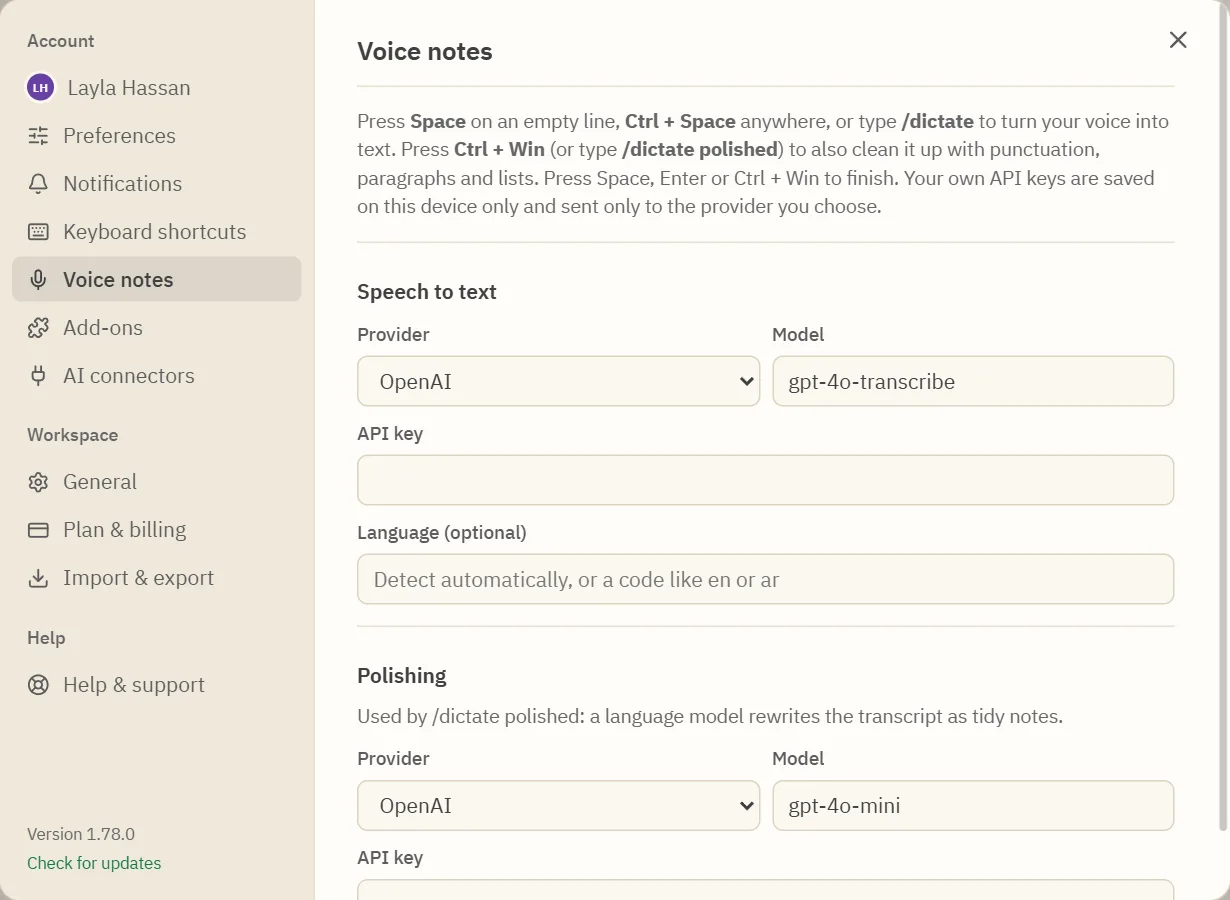
Open Settings → Voice notes.
- Metis Voice comes with Pro and Max: 20 hours a month for each member, shared across the workspace. The free trial includes one hour. The page shows how much you have used. Owners can buy 10 extra hours there; they are used after the month’s hours and last 12 months. Dictation and meeting recordings are turned into text and not kept; a voice note keeps its recording. Metis Voice runs on Metis's server, so in an encrypted Private cloud it asks once before your first recording is written out.
- Your own API keys work on every plan, Free included. Pick a provider for Speech to text and, for polished dictation, one for Polishing, then paste the keys. Keys are saved on this device only. Tick Use my own API keys instead to use them even when you have Metis Voice hours. Once the hours run out, your own keys take over.
Meeting transcripts
On Pro and Max, type /meeting to record a meeting. Metis writes a transcript that says who said what. In the desktop app it records your microphone and the computer’s sound, so people you hear through headphones are included.
- Up to 10 of each member’s monthly hours can go to meetings. Top-up hours are not used for meetings.
- In the Windows app, Metis notices when a Zoom, Teams or Google Meet call starts and offers to take notes. Click the notification to open a new meeting page and start recording. Turn this off in Settings → Voice notes.
- A meeting stops by itself shortly after the call ends, or after five quiet minutes once you don’t answer Still in the meeting?. The transcript is still written.