AI connectors
Let AI apps like Claude, ChatGPT and Gemini search, read and add to your notes.
Connected apps can search your pages, read them, create pages, add to a page and add rows to a database. Set them up in Settings → AI connectors. There are two kinds.
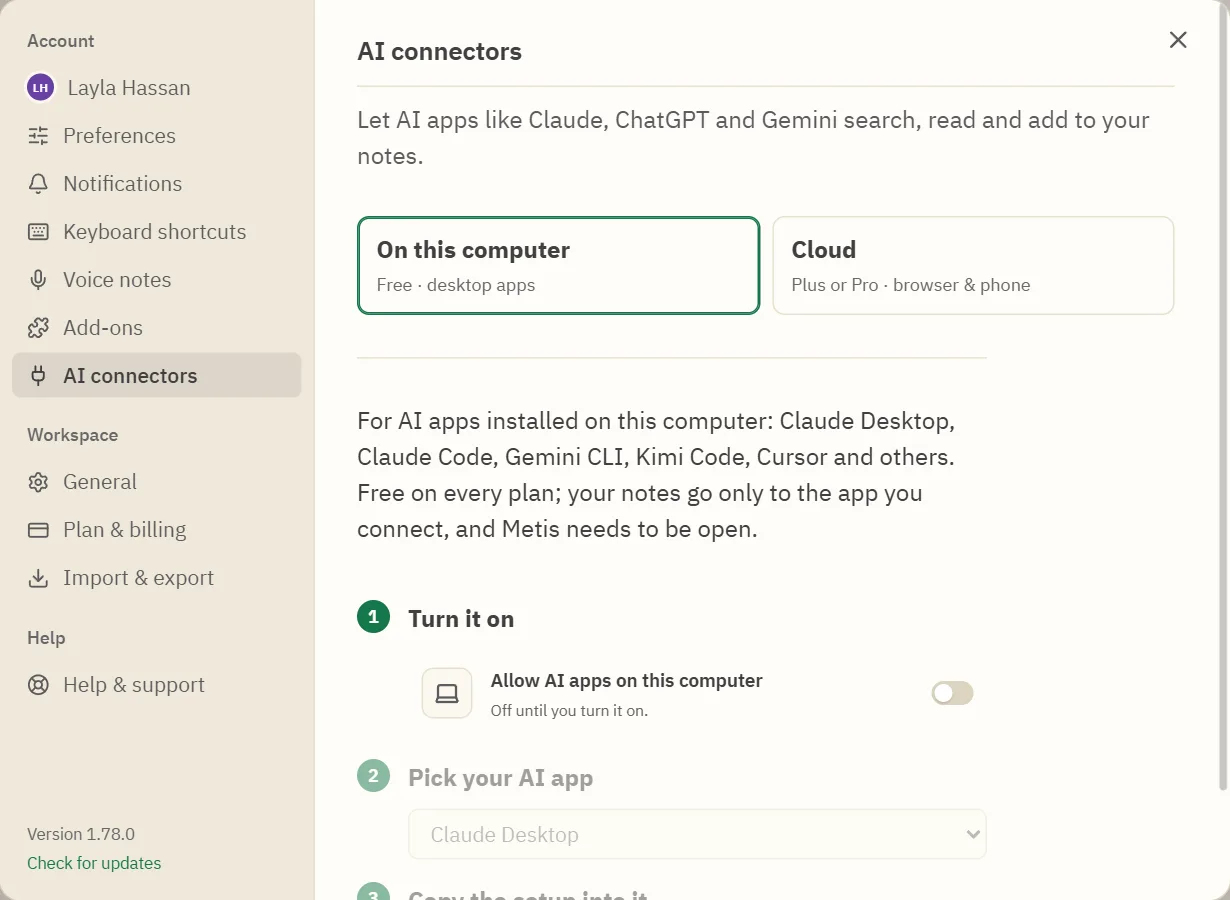
On this computer
For apps installed on your computer: Claude Desktop, Claude Code, Gemini CLI, Kimi Code, Cursor and others. Free on every plan, and needs the Metis desktop app.
- Open the On this computer tab and choose Turn it on.
- Under Pick your AI app, choose yours.
- Copy the setup into the app as shown, then restart the app and try it.
The apps reach the notes in the workspace open in Metis, so Metis needs to be running. The setup holds a private token. Keep it to yourself; making a new one stops the old one.
Cloud
For AI apps in the browser and on your phone: Claude, ChatGPT, Gemini and Grok. Needs a workspace that syncs to the cloud, on Plus, Pro or Max.
- Open the Cloud tab and copy the Metis address.
- Add it to your AI app. The tab shows the exact steps for each app, for example in Claude: Settings → Connectors → Add custom connector.
- Sign in to Metis when the app asks.
Connected apps lists the apps that can reach your notes. For apps that cannot sign in, such as your own scripts, Make a link creates a personal address. It is shown once, and anyone with it can reach your notes.